
Jul 23 / ExamCure Editorial Team

DHA Sheryan Registration Guide 2026: Step-by-Step Application for General Practitioners

Key Takeaways

  • DHA Sheryan registration is the start of your GP licensing application, but the exact requirements and order can change based on your background and application type

  • Document consistency across Sheryan and DataFlow is a common pass-or-fail detail that affects whether your application moves forward or gets returned

  • Sheryan, DataFlow verification, eligibility assessment, exam booking, and final license activation are separate steps, so treat them as different checkpoints rather than one combined task

Avoid delays by understanding the DHA pathway before you upload

You can upload every document once and still lose weeks if one detail does not match. A single mismatch (like a different name spelling, a date gap, or the wrong service selection) often triggers rework and repeated requests, even when the document itself is valid.

As a benchmark, most first-time applicants run into 5–10 preventable errors tied to service choice, date entries, or uploads. By the end of this Part 1 section, you will know the pathway well enough to submit a clean first pass so your application moves forward instead of bouncing back.

Next, think of the DHA pathway as a chain where each step depends on the last: account setup, service selection, data entry, uploads, then verification connections. If you do one thing first, make it this: confirm what you are applying as (for example, general practitioner) before you type dates or upload files, because the wrong service can force you to re-enter sections later.

Here’s the catch: the process works best when your timeline is consistent across forms and documents, but it fails when you rush and fix things after upload. If you’re short on time, skip formatting and renaming files and instead spend 20 minutes checking these high-impact items:

  • Name order and spelling matches passport and degree

  • Dates (graduation, internship, employment) match across entries and letters

  • Licensure status and validity dates are current and consistent

  • Uploads are readable scans and the correct document type for each field

Understand what the DHA Sheryan portal is and what it is not

Next, treat Sheryan as the place where your DHA licensing application is built and tracked, not the place where your credentials get verified or your exam gets booked. For GP applicants, Sheryan is the DHA professional licensing portal where you create your profile, choose the right service, enter your education and experience, upload your documents, and connect the required verification steps.

Here’s why this matters: the order and labels you see in Sheryan can look slightly different depending on your profile, such as where you trained, your current country of practice, your internship pathway, or whether you are applying as a new applicant versus updating an existing profile. The core idea stays the same, but the portal may present different required fields, document slots, or status messages based on what you select.

A common mistake is thinking Sheryan “checks” your documents for authenticity. Sheryan checks completeness and format, but primary source verification is handled elsewhere. If you do one thing, do this: keep a simple map of which task happens in which system so you do not wait for a status change that can only happen outside Sheryan.

| System | What it is for | Typical actions a GP applicant does | |---|---|---| | DHA Sheryan | Application intake and tracking for DHA licensure | Create account and profile, select GP service, enter personal data, add education and experience, upload PDFs, connect verification request, pay applicable fees, submit and monitor status | | DataFlow (primary source verification) | Verifies documents directly with issuing sources | Start/authorize PSV, provide document details, respond to queries, track verification progress, resolve mismatches such as name or dates | | Prometric or an approved exam platform | Exam delivery for DHA-required assessments (when applicable) | Create exam profile, book a test date, pay exam fee, follow ID requirements, complete the exam, access results where provided |

If you’re short on time, focus on entering clean data in Sheryan first, then schedule your verification and exam actions in parallel where possible. This reduces rework later, especially when a DataFlow query forces you to correct a date, spelling, or document type inside Sheryan before you can move forward.

Prepare your file pack and prevent consistency issues before you start
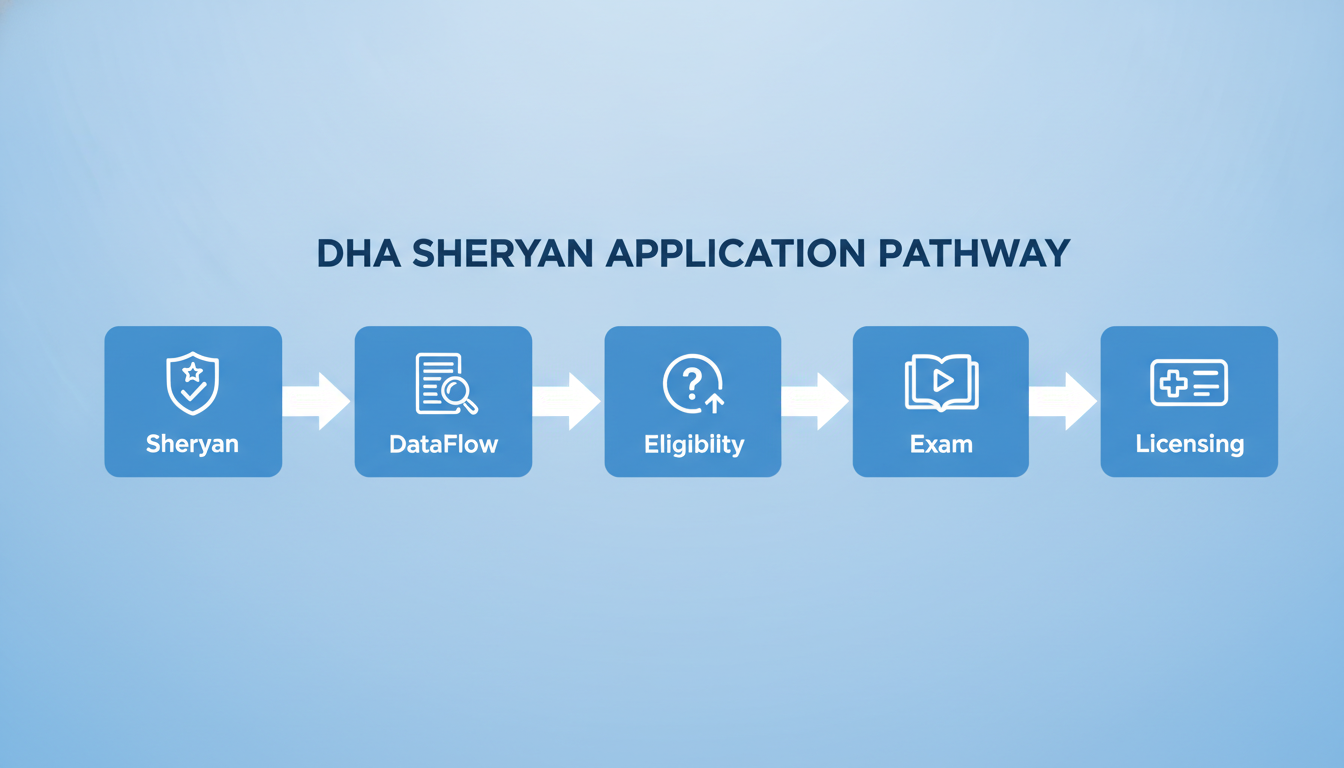
Next, treat your Sheryan application like a short audit: if your documents match each other, the portal steps go quickly; if they do not, you can lose days chasing corrections and re-uploads.

A practical benchmark before you begin is to have one complete, readable PDF set ready and a single master “name and dates” record you can copy from, so you do not type one version in Sheryan and upload a different version in your documents.

If you do one thing, do this: build a pre-application checklist and check each item for exact consistency in name spelling, date of birth, graduation date, internship dates, and license validity dates. A common mistake is assuming a minor difference like “Mohamed” vs “Muhammad” or a different date format will be ignored; the fix is to standardize one “official” version based on your passport and make every document match it (or provide a clear supporting explanation where updates are not possible).

If you’re short on time, skip perfect file naming and focus on clean scans and consistency on the five checkpoints above, because those are the fastest ways to prevent avoidable back-and-forth.

| Item | Why it matters | Common problem | Preparation tip | |---|---|---|---| | Passport (bio page) | Sets your official identity details used across the file | Name order differs from certificates | Copy your name exactly as shown on the passport and keep it consistent everywhere | Recent photo | Used for profile and identification in the portal | Low resolution or wrong background | Use a clear, recent image and keep a spare copy in standard format | Medical degree certificate | Proves primary qualification | Name differs from passport, missing stamp | Verify the name matches passport; scan both sides if relevant | Transcript (if applicable) | Supports education details and dates | Missing pages, unclear dates | Merge into one PDF and check graduation date against Sheryan entry | Internship certificate/letter | Confirms required clinical training | Internship dates missing or overlapping incorrectly | Ensure start and end dates are stated clearly and match your application entry | Experience letters | Proves post-internship practice | Employer letter omits role, department, or dates | Ask for role title, facility name, start and end dates, and signature | Professional license(s) | Shows current or previous authorization to practice | License expired or does not match role claimed | Upload the latest version and confirm the profession category matches your application | Good Standing Certificate | Confirms professional conduct status | Issued too early or by the wrong authority | Request from the correct regulator and keep a clear issue date on the document | UAE licensing history (if any) | Helps reconcile prior registrations and records | Previous DHA/MOH/DOH details not disclosed | Prepare old license numbers and facility details before you enter anything | Translations (if needed) | Allows review of documents not in English/Arabic | Translation not complete or missing key pages | Translate full documents and keep original + translation paired in the same file set | Name consistency checkpoint | Prevents identity mismatch | Different spellings across documents | Choose one spelling based on passport and keep it identical across uploads and forms | Date consistency checkpoint | Prevents timeline conflicts | Internship or employment dates do not align | Create a simple timeline (month/year) and match all letters and entries to it |

Complete the DHA Sheryan application correctly and connect DataFlow

Next, treat Sheryan as a structured data entry task, not a form you can “fix later.” A common delay is creating a duplicate account (for example, registering once with a personal email, then again with a work email) and splitting your records across two profiles.

If you can do one thing before typing, confirm you still have access to the email and phone number used previously, and keep one consistent spelling for your name across every step.

Follow a simple sequence and do not skip ahead, even if a section feels repetitive:

  • Choose the correct professional service for your role (GP vs another category)

  • Enter personal details exactly as your passport and primary ID show them

  • Add education and internship with the same dates and institution names used in your certificates

  • Add professional experience in a clean timeline with no unexplained gaps (for example, Month/Year to Month/Year)

  • Upload documents using readable, complete scans (avoid cropped stamps or missing pages)

  • Review every field once more, then submit

Here’s the catch: most “system errors” are actually mismatches you typed in earlier, like swapping day and month in a date of birth or using two different spellings of a university name.

Also, DataFlow verification is not a separate task you do in isolation. It connects to the DHA licensing pathway because it is the verification layer for the credentials you entered in Sheryan, typically your identity, education, internship, registration, and experience.

Matching details matters because reviewers compare Sheryan entries to what DataFlow verifies. If your Sheryan record says your internship ended in 08/2020 but your certificate shows 09/2020, you can trigger a back-and-forth that costs weeks rather than days.

So, if a discrepancy appears, do not guess or “average” dates. Use this quick fix order:

  • Check your original document first (passport, degree, internship certificate, experience letter)

  • Update Sheryan entries to match the document you will submit and have verified

  • If the document itself contains a mistake, ask the issuing body for a corrected letter or an official clarification note before you proceed

  • Re-upload the corrected file and keep one version as the final reference

If you’re short on time, prioritize matching these fields across Sheryan and DataFlow: full name order, date of birth, passport number, graduation date, and internship start and end dates.

Closing remarks

Next, remember this before you touch the upload button: accuracy beats speed. A fast application with one mismatch can cost you days of back-and-forth, especially when names, dates, or license details do not line up across documents.

If you do one thing today, pick one mismatch you can fix before starting your Sheryan registration. Common high-impact fixes include:

  • Passport name vs. degree name (middle names, initials, spacing)

  • Internship dates in your certificate vs. the dates you enter in the portal

  • Facility name on experience letters vs. what appears on your license or contract

  • License number or issue dates copied incorrectly into the application

That said, always verify the latest official DHA instructions inside Sheryan before final submission. Screens, required fields, and accepted document formats can change, so treat the portal’s current guidance as the final checklist for what to enter and what to upload.

SEO and on-page essentials for Part 1

Next, use the on-page basics below so Part 1 is easy to find and clear in search results.

  • SEO title (under 60 characters): DHA Sheryan Registration Guide 2026 for GPs

  • Meta description (150–160 characters, primary keyword included): DHA Sheryan registration made clear for GPs: what to prepare, how to apply, avoid errors, and connect DataFlow for Dubai licensing

  • Suggested URL slug: /blog/dha-sheryan-registration-guide-2026

Quick Summary Box

Also, here is the fastest way to orient yourself before you start clicking through Sheryan.

  • What Sheryan is: DHA’s online portal where General Practitioners submit key registration and licensing application details and upload required documents

  • Who uses it for DHA GP registration: International and locally trained GPs applying for a DHA license, plus employers or PROs who may support the submission if you are applying through a facility

  • Where it fits in the pathway: Sheryan is where you enter your application data and connect verification steps (such as DataFlow) after you have your documents ready

Next, prepare these items before you begin so you do not have to pause halfway through.

  • A clear scan set of your core documents (passport, photo, qualification documents, experience letters, internship evidence where applicable)

  • A single “master version” of your personal details to copy from (full name spelling, date of birth format, passport number, nationality, email, phone)

  • A simple file plan (for example, PDF naming like Passport_Name, MBBS_Degree_Name, Experience_2022-2024_Clinic) so uploads are easy to spot during review

That said, the top warning is about wrong service selection and mismatched details. If you choose the wrong professional service (for example, selecting a category that does not match your GP pathway) or your name and dates differ across passport, degree, and experience letters, corrections can take days to weeks.

  • If you do one thing: match your name spelling and dates across every document before you start

  • Common mistake and fix: selecting the service that “sounds right” instead of the one that matches your qualification and scope, then fixing it by stopping early and confirming the correct service before entering the rest of the application

Table of Contents covering Part 1 and Part 2

Next, use this table of contents to jump to the exact step you need, whether you are preparing your file pack, submitting in Sheryan, or checking what a status message means.

If you do one thing, start with the part that matches where you are today: Part 1 for starting and submitting, Part 2 for statuses, requests, outcomes, and what happens after approval.

  • Part 1: What Sheryan is, who uses it, where it fits, what to prepare, how to complete the portal application, how DataFlow connects, common mistakes

  • Part 2: Application status meanings, additional information requests, eligibility and assessment outcomes, exam approval, delays and returned applications, troubleshooting, FAQs, post-approval steps

Want your DHA application to move forward the first time

You finally sit down to start DHA Sheryan registration, and the portal looks straightforward until you hit fields you are not sure about, document uploads that reject silently, or requirements that seem to change depending on your background.

A practical benchmark: most preventable returns come from mismatched dates, names, and document sets rather than “hard” eligibility problems. The catch is that the right pathway can differ by profession, qualifications, years and type of experience, and current DHA policy, so copying another clinician’s steps often backfires.

By the end of this section of the guide, you will be able to prepare a clean document pack, complete the major Sheryan fields with fewer errors, and submit with fewer preventable returns, so your timeline is driven by review time rather than avoidable fixes.

What Is the DHA Sheryan Portal

Next, think of the DHA Sheryan portal as the main online account area where applicants enter, update, and track information needed for DHA licensing steps. It is where you fill in your details, upload supporting documents, and follow the status of your application-related actions.

It helps keep your application data in one place, but it is not a replacement for document verification itself or for checking that your documents match each other. If you do one thing, treat Sheryan as your official data entry record and double-check every field before you move on.

Here’s the catch: many delays come from mixing up what each system is for. Use the quick table below to keep the roles clear.

| Platform | Main purpose | Typical applicant action | |---|---|---| | DHA Sheryan portal | Online hub to submit and manage your licensing application details | Create an account, complete forms, upload files, monitor status | | Document verification system (third-party) | Verifies the authenticity of education and experience documents | Provide required document set, respond to clarifications, track verification progress | | Email or support channels | Communication for questions, missing items, and clarifications | Send a specific inquiry, attach requested proof, keep reference details handy |

Who Needs to Use Sheryan

Next, it helps to know whether Sheryan is something you personally must use, or whether your facility will complete key steps for you.

If you are a new General Practitioner applicant, you will typically use Sheryan to start and track your DHA licensing process, upload required documents, and link verification steps such as DataFlow to your application. This is the most common scenario and usually involves applicant-led inputs like identity details, education history, internship dates, and work experience.

But Sheryan is not only for first-time applicants. Existing DHA-licensed professionals also use it for changes and ongoing needs, for example:

  • License renewal when your license is nearing expiry

  • Transfer scenarios when you move between facilities and need the licensing record updated

  • License modification requests, such as updates to personal details or other profile-linked fields that must match your documents

Here’s the catch: not every service follows one identical pathway. Some requests are applicant-led (you submit and upload), while others are facility-led (your clinic or hospital initiates or approves steps in their facility account), so your first move is to confirm who owns the action before you start uploading files.

Where Sheryan Fits in the DHA GP Licensing Process

Next, it helps to place Sheryan in the full DHA GP licensing pathway so you do not start uploading documents before you know what comes before and after.

High-level pathway (sequence can vary by case):

  1. Check your GP eligibility and required documents before you create an application (see DHA GP Eligibility Criteria 2026)

  2. Create your Sheryan profile and start the DHA GP application, entering your personal, education, and experience history

  3. Upload your documents in the format Sheryan expects, keeping names and dates consistent across every file

  4. Initiate primary source verification (DataFlow) for the required credentials and connect it to your application (see DHA DataFlow Verification Guide 2026)

  5. Meet the assessment requirements for your category, including the Prometric exam when applicable (see DHA GP Prometric Exam Complete Guide)

  6. Track statuses in Sheryan, respond to return notes, and resubmit corrected items within the portal timeline

  7. Receive the final outcome and complete any remaining steps requested by DHA in Sheryan

So the practical takeaway is that Sheryan is where you enter, upload, and track, while eligibility checks, DataFlow verification, and exams are related steps that feed into or follow your portal actions.

If you do one thing, confirm eligibility first, because starting in Sheryan without meeting minimum requirements often leads to avoidable returns and rework later.

What to Prepare Before Starting the Application

Next, treat Sheryan like a form you want to finish in one sitting, not a place to store documents and figure things out later. A common delay point is getting halfway through, then realizing a missing Good Standing letter, an inconsistent name spelling, or an incomplete internship record forces you to stop and rework multiple fields.

If you do one thing, build a single folder (and a simple notes file) before you click Start. If you’re short on time, collect identity, qualifications, and Good Standing first, then gather experience and employment history details while your other letters are being issued.

Pre-application checklist (gather before you begin)

Also, use this as your quick file pack checklist. The goal is not “more documents”, it’s “the right documents with matching details”.

  • Identity

    • Passport biodata page

    • National ID (if applicable)

    • Recent passport-style photo (keep a consistent version)

  • Contact details you will enter in Sheryan

    • One email address you can access daily

    • One mobile number with country code

    • Current residential address (as you will type it)

  • Qualifications

    • Primary medical degree certificate

    • Transcripts or mark sheets (if you have them)

    • Postgraduate qualifications (if applicable)

  • Internship

    • Internship certificate showing start and end dates

    • Rotation or completion letter if your internship certificate is vague

  • Professional experience

    • Experience certificates for each employer with exact start and end dates

    • Role title as written on hospital letters (e.g., GP, Junior Doctor, Medical Officer)

  • Registrations and licensing history

    • Current professional license or registration certificate

    • Prior UAE licensing details (DHA, DOH, MOHAP) if you have them, including license number and validity dates

  • Certificate of Good Standing

    • Current Good Standing letter from your regulator, usually issued recently

    • If you have multiple regulators, note which one matches your most recent active license

  • Translations (only if a document is not in English)

    • Legal translation copies

    • Original language copy kept alongside the translation

  • Employment history notes (for accurate data entry)

    • Month and year for each start and end date

    • Any gaps explained in one line for your own reference

    • Supervisor and facility contact details if shown on certificates

Preparation table: what to collect and how to avoid common problems

That said, the same few issues cause most back-and-forth: unclear dates, missing letterheads, and mismatched names. Use the table below to spot problems before they become rework.

| Item | Why it matters | Common problem | Preparation tip | |---|---|---|---| | Passport biodata page | Confirms identity details Sheryan will reuse | Different spellings across documents | Write your name exactly as on the passport and use it everywhere | | Photo | Used for profile and sometimes file labeling | Old photo or inconsistent background | Use one recent photo and keep it in JPG format | | Email and mobile number | Used for account access and notifications | Using a work email you later lose access to | Use a personal email you check daily | | Primary medical degree | Core qualification for GP pathway | Missing stamp, unreadable scan | Scan in color and check every page is legible | | Transcripts | Supports degree details and dates | Transcript missing graduation date | Save both transcript and degree; note date sources | | Internship certificate | Confirms required supervised training | Certificate does not show exact dates | Get a letter that states start and end month/year clearly | | Experience certificates | Confirms clinical practice time | Duties listed but dates missing | Ask HR for a standard letter with dates, role title, and letterhead | | Current registration or license | Shows you are registered to practice | Expired license uploaded by mistake | Check validity dates before uploading | | Good Standing letter | Often required for verification and review | Issued too long ago or from the wrong regulator | Request a fresh letter from the regulator tied to your active license | | Prior UAE license details (if any) | Helps avoid duplicate profiles and confusion | Applicant forgets old license number or uses wrong authority | Keep a note with authority, license number, and validity period | | Legal translations | Allows review of non-English documents | Translation missing translator stamp | Keep original plus stamped translation in the same folder | | Facility contact details on letters | Supports verification steps later | Old employer closed or contact info missing | Prefer letters with HR email/phone and full facility address |

Works best when your folder matches the order you will enter information (identity, education, internship, experience, registration). Fails when you rely on memory for dates or switch between multiple versions of the same certificate, so keep one final “upload-ready” copy of each file.

Checking Document Consistency

Also, treat consistency as a pass or fail check before you upload anything. In practice, reviewers often expect exact matches across your core identifiers, and small differences can trigger a clarification request and slow the timeline.

What should match exactly (or be clearly explained with evidence):

  • Full name order and spelling across passport, application profile, degree(s), internship certificate, experience letters, and Good Standing Certificate

  • Date of birth in the same format and value on every ID document and application field

  • Qualification titles as written on the certificate (for example MBBS vs Bachelor of Medicine and Bachelor of Surgery)

  • Graduation and internship dates (month and year matter, not just the year)

  • License and registration numbers on licenses, renewal letters, and Good Standing Certificate

If you do one thing, make a one-page “master identity sheet” before you start: write your name exactly as on your passport, your DOB, your most recent license number, and a clean timeline (graduation date, internship start and end, first employment month/year). Then compare every document against it and fix mismatches before uploading.

Next, plan for legitimate differences and document them early, instead of hoping they will be ignored. The goal is not to argue the difference, but to make it easy for a reviewer to see that the records refer to the same person and the same qualification.

Common legitimate differences and what usually helps:

  • Married name vs maiden name: include a supporting document that links both names (for example an official name change or marriage record, plus consistent use on newer documents)

  • Transliteration differences (Arabic, Cyrillic, etc.): provide a letter or supporting record showing both spellings tied to your passport identity

  • Abbreviations and initials (A. Khan vs Ahmed Khan): use documents that show the full name, and avoid mixing formats inside the application fields

  • Institutional name changes (college renamed or merged): upload supporting evidence such as an official letter or transcript showing the older and newer institution names

Here’s the catch: consistency fixes work best when you correct the source document (for example, an updated letter with the right license number); they fail when you only add notes without proof. This is general process guidance, not legal advice, so if you are unsure what evidence is acceptable, confirm through official DHA guidance before submitting.

Creating or Accessing a Sheryan Account

Next, start by using the official Sheryan portal entry point you have from DHA communications or your employer, then choose a supported sign-in method and proceed to create your profile. Plan for a short setup window, then a second pass to validate details, because the fastest way to delay later steps is to rush account creation and miss a mismatch.

If you do one thing, make sure the name, date of birth, nationality, and passport number you enter match your documents exactly, character for character. A common mistake is using a different spelling than the passport or a different date format than what appears on the ID page, then trying to fix it downstream when uploads and verification are already in progress.

In practice, follow this simple sequence and keep it consistent:

  • Access the official portal and select your sign-in method

  • Create one profile and record the email and phone number you used

  • Complete profile fields using your passport as the primary reference

  • Verify personal details before you start the licensing service flow

Here’s the catch: do not create multiple profiles to fix a login issue. Multiple accounts can fragment your application history and make identity checks harder; instead, use the password reset or account recovery options and keep one set of credentials stored securely in a password manager or a locked record.

Selecting the Correct Professional Service

Next, choose the professional service carefully before you fill any forms. Picking the wrong service is one of the fastest ways to trigger delays, extra back-and-forth, or a returned application, because your uploads and verifications may not match what that service expects.

Also, do not rely only on the wording you see on the portal. Labels and menu names can change (for example, “registration” vs “licensing” or “activation”), but the underlying choice still comes down to what you are applying for and who is sponsoring the process.

Before you select a service: quick checklist

So, pause for 2 minutes and confirm these items before clicking into the next step:

  • Profession and category: General Practitioner vs specialist vs dentist vs nurse

  • Correct title: match your primary qualification and recent clinical role (for example, “General Practitioner” vs “Resident”)

  • Application type: new application vs renewal vs transfer (transfer often means you already hold eligibility and are moving it)

  • What you need right now: assessment (eligibility) vs activation (making an existing eligibility usable with a facility)

  • Who is leading the application: individual/self vs facility-led (HR initiates and links you)

Here's the catch: if you do one thing, make sure the service you select matches your current goal. A common mistake is selecting “renewal” when you actually need transfer, or selecting “activation” before your assessment is done; the fix is to step back, re-check your last DHA status, and only then proceed.

Entering Personal Information Correctly

Next, treat the Personal Information page like a data-matching task, not a form you can “clean up.” A single extra space, swapped name order, or different date format can cause a mismatch later when your documents are checked against your Sheryan profile and third-party verification records.

If you do one thing here, copy every field exactly as it appears on your passport and your primary ID, then keep that same formatting everywhere you use your details (Sheryan, DataFlow, and any linked accounts). This is especially important when your name has multiple parts or your documents show both English and non-English spellings.

Use this checklist before you click Save:

  • Full name: copy the exact spelling, order, and spacing from your passport MRZ page and the printed name line

  • Previous names: enter any prior legal names (for example, maiden name) exactly as shown on supporting documents

  • Nationality: select the same nationality shown on the passport you will upload

  • Passport number: copy carefully, then re-check each character (common mix-ups include 0 vs O and 1 vs I)

  • Date of birth: match the document format; if the system forces a format, confirm the day and month did not swap

  • Gender and place of birth: match what your passport or national ID states

  • Contact details: use an email and phone number you will keep active for at least 3 to 6 months

  • Address: write it consistently across forms; if you shorten street or building names in one place, shorten them the same way everywhere

  • Identification: when asked for national ID or other identifiers, use the same document type you will upload later

Here's the catch: trying to “standardize” your details can backfire. For example, a GP applicant might prefer “Mohamed A. Al Hassan,” but if the passport shows “MOHAMMED ABDULLAH ALHASSAN,” entering a shortened version can create a mismatch during verification.

Common mistake and fix:

  • Mistake: entering your preferred name, then uploading a passport with a different spelling/order

  • Fix: update the form to match the passport first, then keep that exact version for every later step

If you're short on time, verify these three fields first because they cause the most downstream mismatches: full name, passport number, and date of birth.

Entering Education and Internship Details

Next, treat this step like a data-entry task, not a storytelling task. Before you type anything, open your degree certificate, transcript, and internship completion letter so you can copy names and dates exactly as printed.

If you do one thing here, make your education and internship dates match across every place they appear. Even a small mismatch like 06/2018 in one field and 07/2018 on a letter can trigger a manual check and delay.

Prepare your education entry before you start typing

Also, prepare a single “source of truth” line for each education item, then paste from it. For a GP applicant, this usually means your medical school (MBBS/MD or equivalent) with the same spelling and country each time.

Use this checklist before you enter education:

  • Degree title exactly as on the certificate (for example, MBBS vs MD)

  • Institution name as printed, including campus or city if shown

  • Country where the institution is located (not your nationality)

  • Graduation date in the same format used on your certificate (month/year or exact date)

  • If your documents show start date, keep it consistent everywhere you enter it

A common mistake is “correcting” the institution name to a shorter or more familiar version. Fix: copy the full official name from the certificate, then keep that spelling for DataFlow and all uploads.

Enter internship details so they verify cleanly

That said, internship data is often where otherwise clean applications get stuck. Enter your internship as internship or training if the portal gives that option, and keep it separate from paid employment unless your documents clearly label it as an employment contract.

What to prepare for your internship entry:

  • Internship institution name exactly as on the completion certificate

  • Internship start and end dates (day/month/year if available)

  • Any required registration or program name shown on the certificate

  • Rotations documentation if your system requires it (for example, medicine, surgery, pediatrics, OB-GYN) with dates that fit within the internship period

Here’s the catch: internships entered as employment may create a mismatch when your experience section is reviewed. Fix: list the internship under the dedicated internship or training area, and reserve the experience section for post-internship jobs as a medical officer or GP.

Common errors and quick fixes

In practice, most problems come from small inconsistencies, not missing credentials. Do a 10-minute cross-check against your PDFs before moving on.

Common errors to avoid:

  • Internship entered as employment when the supporting letter calls it internship

  • Inconsistent dates between education, internship, CV, and uploaded letters

  • Graduation date entered as the date the certificate was issued instead of the completion date

  • Rotations listed without dates or with dates that fall outside the internship period

If you’re short on time, skip perfect wording and focus on matching names and dates across fields and documents. Clear, consistent entries verify faster than detailed entries that conflict.

Entering Professional Experience without causing eligibility or verification issues

Next, treat the Professional Experience section like a timeline that a verifier will try to confirm line by line. Enter each job exactly as it appears on your employment letter: employer name, job title, start and end dates, and workload (full-time or part-time). If you do one thing, make sure the dates you type match the dates on your documents and can be supported by payslips or HR confirmation if requested.

Also include duties in plain, clinical language that fits your role and setting. Keep it short and specific so it is easy to validate, for example outpatient primary care, chronic disease follow-up, acute triage, minor procedures, on-call coverage, EMR documentation, and referral coordination.

That said, do not try to adjust titles or dates to look more eligible. Changing “GP Resident” to “General Practitioner,” rounding up start dates, or removing a short contract can create a mismatch during verification, which can slow your file or lead to rework. Works best when you keep the exact HR wording and then clarify scope in the duties field rather than renaming the position.

In practice, a clean experience entry looks like this:

  • Employer: Al Noor Medical Center, Dubai

  • Title: General Practitioner

  • Dates: 01 Mar 2022 to 30 Jun 2024

  • Workload: Full-time, 40 hours per week

  • Duties: Manage adult and pediatric primary care clinics, acute presentations, chronic disease clinics (DM, HTN), routine health checks, basic procedures (sutures, wound care), vaccination counseling, referrals, and EMR documentation

Here’s the catch: gaps, overlaps, and continuity matter. If you had a 2-month gap between contracts, list it honestly and be consistent with your CV and documents. If two roles overlap (for example, part-time clinic plus hospital locum), enter both with the correct workload and avoid making the combined hours unrealistic.

Uploading Documents Correctly

Next, treat uploads as a quality-control step, not admin work. One unclear scan or a mismatched category can trigger re-uploads and slow down review, even when the document itself is valid.

If you do one thing, do this: open every file after uploading and check it at 100% zoom on a phone and a laptop. If either view makes stamps, signatures, or dates hard to read, re-scan before you move on.

Use this upload checklist before you attach any file:

  • Clear scans with sharp text (avoid motion blur)

  • Full pages included (no cut-off headers, footers, or seals)

  • Correct orientation (upright, not sideways)

  • Legible stamps and signatures (check ink contrast)

  • File format and size match portal limits (if unsure, use PDF as default)

  • Correct category selected (match the document type, not the purpose)

  • Certified translations attached when the original is not in English or Arabic

Common mistake and fix:

  • Mistake: combining unrelated documents into one PDF to reduce uploads

  • Fix: keep one document per file unless the portal clearly asks for a multi-page set (for example, a multi-page certificate)

Here is a quick Good Upload vs Poor Upload comparison you can use as a final check:

  • Legibility

    • Good Upload: text is readable at 100% zoom; stamps and signatures are clear

    • Poor Upload: blurry, low contrast, shadows over the page, faint stamps

  • Completeness

    • Good Upload: every page is included; backs of stamped pages are added when relevant

    • Poor Upload: cropped margins, missing page 2 of 2, cut-off seals or page numbers

  • Authenticity signals (what reviewers can quickly verify)

    • Good Upload: consistent name spelling across pages; visible issuing details; clear certification marks on translations

    • Poor Upload: mismatched names across files; missing issuing details; translation uploaded without certification proof

Constraint tip: if you are short on time, re-scan only the pages with stamps, signatures, and ID numbers first. Those are usually the first items reviewers check for clarity.

Connecting DataFlow Verification to the Application

Next, treat DataFlow as a separate verification track, not as your Sheryan application. Primary-source verification checks your documents with the issuing bodies; Sheryan is where you submit your licensing application and track requirements. DataFlow supports eligibility and licensing decisions, but it does not replace entering accurate information and uploading the right files in Sheryan.

Also, use one simple rule to prevent avoidable mismatches: make your “identity data” identical across all places it appears. If you do one thing, match your full name order and spelling, date of birth, passport number, and qualification dates across your passport, degree, internship certificate, experience letters, Sheryan entries, and the DataFlow case details.

That said, you should monitor both systems at the same time, especially during the 2 to 8 week window when verifications commonly move through different statuses. A common mistake is assuming “submitted in Sheryan” means “verification is moving” or assuming “DataFlow started” means “Sheryan is complete”; the fix is to check both dashboards and keep a short log of what changed and when.

Here's the catch: discrepancies are normal, but silence is not your friend. If DataFlow flags a mismatch, respond with supporting evidence rather than re-entering random variations.

  • If your name format differs, provide a notarized name affidavit or an official letter showing name equivalence

  • If dates differ, submit an official corrected document or a registrar letter showing the correct dates

  • If an employer cannot be reached, provide alternate verification evidence like HR emails from a work domain, stamped letters, or contract and payslips if accepted

  • If a document is rejected for quality, re-upload a clear color scan (300 dpi is a useful target) and ensure all pages are included

Reviewing the Application Before Submission

Also take 10 to 15 minutes to review everything before you click submit. Most delays at this point come from small mismatches, like one date typed differently than it appears on a certificate, or a missing page in an upload.

If you only do one thing, run a final checklist once from top to bottom without editing anything else at the same time. If you are short on time, prioritize identity details, dates, and required documents first, then come back to optional fields.

Use this final pre-submission checklist:

  • Correct application title and application type selected

  • All required fields completed with no blank sections

  • Names match across passport, degree, license, and Good Standing letter (same order and spelling)

  • Dates are consistent across education, internship, and employment (month and year format matches)

  • Documents uploaded are the right file, readable, and complete (all pages included)

  • Good Standing letter is included and still valid at the time you submit

  • DataFlow information is entered correctly and linked to the right application

  • Translations included when a document is not in the required portal language

  • Contact details are current (email, phone, address) and will work for follow-up

Common mistake: uploading a file that is correct but outdated, like an older Good Standing letter or an expired passport scan. Fix: check the issue dates and expiry dates on the document itself, not just the filename.

Next, save copies of everything for later requests. Keep a folder with:

  • Each file you uploaded (final versions)

  • A PDF or screenshots of each submitted version or confirmation page

  • Notes on the exact dates you submitted and any reference numbers shown

This helps if you are asked to resend documents, correct a detail, or share the same pack during facility onboarding.

Common Sheryan Registration Mistakes

Next, use this list as a final quality check before you submit, because most Sheryan delays come from preventable inputs and document issues.

If you only fix one thing, fix consistency: your name, dates, and document set should match across passport, degrees, licenses, experience letters, and DataFlow requests. If you're short on time, re-check the mistakes tied to identity and missing documents first, because these usually trigger a request for more information and stop progress.

  • Choosing the wrong professional service (wrong applicant type)

    • Why it matters: Your application can enter the wrong pathway, which can lead to the wrong document requirements and avoidable rework

    • Do this instead: Confirm your target license category and the service you need before you start, then stop and correct it before uploading anything

  • Selecting the wrong professional title or specialty

    • Why it matters: Your title controls what eligibility rules apply and what your reviewers expect to see in internship and experience

    • Do this instead: Match the title to your primary qualification and typical scope of practice, and keep the same title across Sheryan, DataFlow, and supporting letters

  • Creating duplicate accounts

    • Why it matters: Duplicate profiles can split your history and documents, and you may lose access to previous submissions or requests

    • Do this instead: Try password reset and account recovery first, and keep one account tied to one email and one phone number

  • Name mismatch across documents (spelling, order, missing middle names)

    • Why it matters: Even small differences can block identity validation and DataFlow matching

    • Do this instead: Use your passport name as your master version and apply it everywhere, and if a document shows a different name, prepare an official proof linking both names

  • Omitting active or previous licenses

    • Why it matters: Reviewers may treat missing licenses as a gap or a disclosure problem, and DataFlow may flag inconsistencies

    • Do this instead: List all relevant licenses and registrations, including prior jurisdictions, and upload clear proof for each where requested

  • Uploading incomplete certificates (missing back page, missing stamp, missing transcript page)

    • Why it matters: Incomplete files often trigger an additional information request, adding days or weeks

    • Do this instead: Scan every page that contains identifiers, stamps, signatures, grades, program dates, or registration numbers

  • Poor scans (cropped edges, glare, low resolution, unreadable stamps)

    • Why it matters: If reviewers cannot read the details, they may reject the document and ask for re-upload

    • Do this instead: Use a flat scan or a scanning app in good light, keep all corners visible, and check that stamps and license numbers are readable before uploading

  • Inconsistent dates across education, internship, and experience

    • Why it matters: Conflicting timelines create red flags and cause manual review or clarification requests

    • Do this instead: Build one timeline in a simple table first, then enter the same start and end dates in Sheryan, DataFlow, and letters

  • Confusing internship with professional experience

    • Why it matters: Internship is usually part of training, while experience letters should reflect employed clinical work, mixing them can weaken your eligibility evidence

    • Do this instead: Record internship under education or training where applicable, and record post-qualification employment under experience with clear job title and duties

  • Assuming DataFlow verification equals submitting the DHA application

    • Why it matters: DataFlow is verification, not your licensing decision, you still need a correctly completed Sheryan application and the required uploads

    • Do this instead: Treat DataFlow as one linked step, then return to Sheryan to finish entries, uploads, reviews, and submission

  • Assuming exam booking equals eligibility approval

    • Why it matters: Booking or planning an exam does not mean your file is accepted, and you can still be asked for more information

    • Do this instead: Wait for the correct application status signals and respond to any requests first, then book only when your case supports it

  • Ignoring requests for additional information (or responding without precision)

    • Why it matters: Unanswered requests can pause review, and vague replies often lead to repeated requests

    • Do this instead: Reply within the portal with exactly what was asked, label files clearly (for example, "Experience Letter 2022-2024"), and keep your response tied to the requested item

  • Uploading expired documents (license, good standing, ID, certificates with validity)

    • Why it matters: Expired documents are commonly treated as invalid and can trigger rejection or resubmission

    • Do this instead: Check expiration dates the same day you submit, renew first if needed, and upload the current version only

  • Submitting without checking current requirements

    • Why it matters: Requirements and document formats can change, and an older checklist may cause missing items

    • Do this instead: Re-check the portal requirement list for your service and title before final submission, then confirm your upload set matches it

  • Submitting without a final review pass

    • Why it matters: Small entry errors (wrong digit in passport number, swapped dates, missing upload) create preventable delays

    • Do this instead: Do a 15-minute final check: identity fields, timeline consistency, upload completeness, and DataFlow link confirmation

So, if you hit a delay after submission, it is usually tied to an application status change or a request for more information rather than a single hidden issue.

Part 2 will cover what each status means, how to handle additional information requests, common outcomes, when exam approval happens, why delays occur, troubleshooting steps, FAQs, and what to do next.

Part 1 closing elements for editors

Also use the internal links below where they fit naturally, ideally at moments where the reader would want a deeper definition, eligibility check, or more practice.

  • DHA GP Prometric Exam 2026 Complete Guide

  • DHA GP Eligibility Criteria 2026

  • DHA DataFlow Verification Guide 2026

  • DHA GP Syllabus 2026

  • DHA GP Study Plan 2026

  • DHA GP MCQ Bank

  • DHA GP Mock Exams

  • Free DHA GP MCQs

Next choose one image (or caption) concept and match it with a clear, descriptive alt text that reflects what the image actually shows.

Suggested alt text options:

  • DHA Sheryan registration guide 2026

  • DHA Sheryan portal application for General Practitioners

  • Dubai GP license application steps

  • DHA GP document checklist

  • DHA licensing process for doctors

  • Sheryan and DataFlow application pathway

That said, run this final quality checklist before publishing Part 1, and stop the article after the Common Sheryan Registration Mistakes section.

Final quality checklist:

  • Keyword usage reads natural (no repetitive phrasing)

  • No invented fees, pass rates, or timelines

  • Steps are clearly differentiated (Sheryan account and application vs DataFlow verification vs later exam steps)

  • Checklists and tables are useful, specific, and match the text

  • Ends immediately after Common Sheryan Registration Mistakes

Key Takeaways

  • After submission, your DHA Sheryan registration may move through multiple reviews and requests, and the exact sequence can vary by profile

  • Treat every DHA request as time sensitive and respond with precise evidence, clear filenames, and consistent personal details

  • Examination eligibility is not final licensing, so confirm official authorization before booking and follow the remaining licensure steps

You have submitted your Sheryan application and now the waiting starts
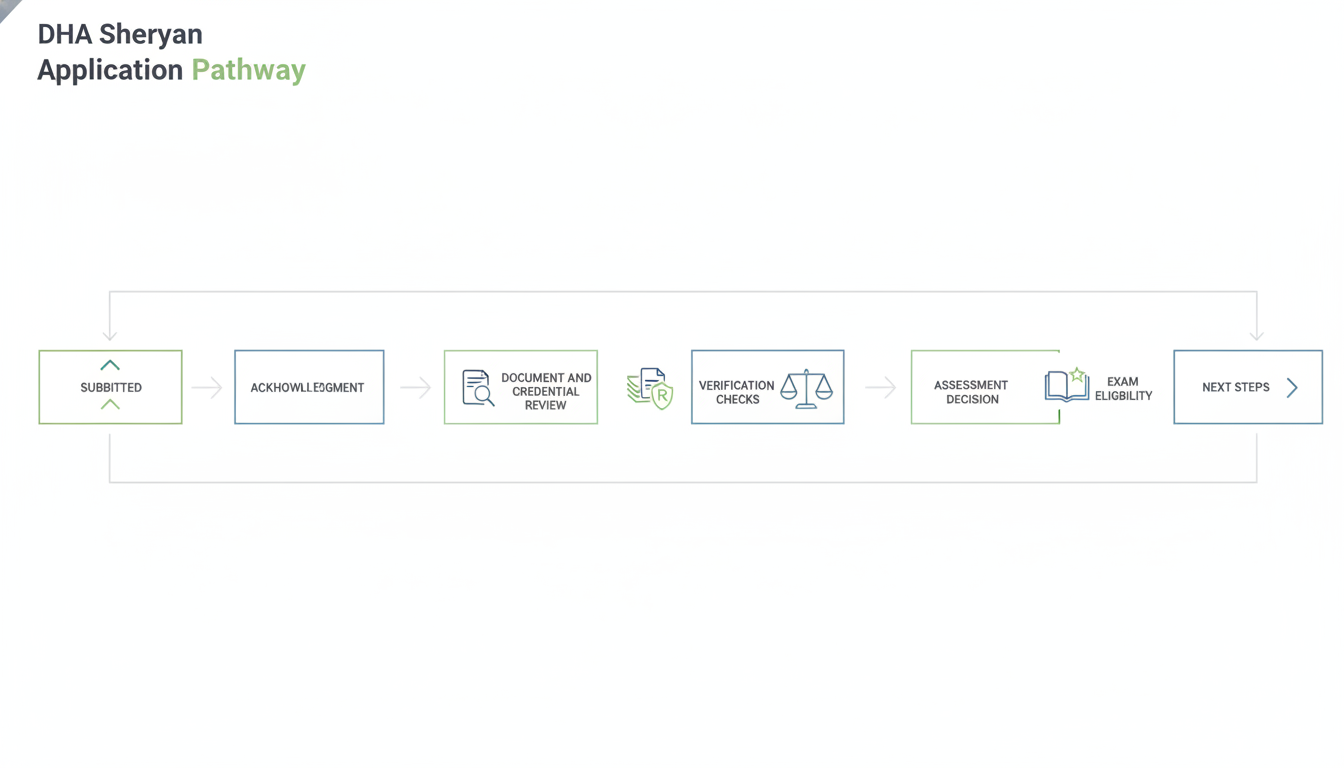
You hit submit, you get the confirmation, and then your DHA Sheryan portal status looks exactly the same for days while a few emails trickle in. That pause can feel like something is wrong, especially if you are trying to plan a start date, a relocation window, or a clinic onboarding timeline.

It is common for regulated applications to go through more than one review cycle, with clarification requests before an outcome. A status that does not move quickly is not a verdict by itself, but it is a cue to get organized so you can respond fast if DHA asks for anything.

Next, treat the waiting period like a short readiness window, not dead time. If you do one thing, make a simple tracker of what you submitted and what can be re-requested, so you are not re-uploading in a rush 10 minutes before a deadline.

  • Check your Sheryan account and inbox at a consistent cadence, such as every 24 to 48 hours

  • Whitelist the email addresses or domains DHA uses for notifications so messages do not land in spam

  • Keep a single folder of source documents and a second folder of the exact files you uploaded, named with dates

  • Block 30 to 45 minutes twice a week to handle clarifications the same day they arrive

But avoid “fixing” documents that were not requested, because making unscheduled edits can create mismatches between versions (for example, a passport scan that no longer matches the one on file). This approach works best when DHA asks for a small clarification like a clearer scan or a missing page, and it fails when you respond with new, unrelated changes that create new questions.

By the end of this section, you should be able to do three practical things: read your DHA application status as a signal rather than a result, respond to requests without introducing new conflicts, and keep momentum toward your Dubai GP license application by preparing your next steps while you wait.

What happens after you submit a Sheryan application

Next, your application usually moves through a predictable sequence, even though the exact labels and order can vary by case and by updates in the portal.

In practical terms, you should be able to track two parallel tracks after submission: what DHA needs to assess your file, and what you can do to prevent delays caused by missing items or unclear uploads.

Typical post submission flow in the DHA Sheryan application

Next, most applicants see a flow like this:

  • Acknowledgment that the application was received

  • Administrative completeness check (are required fields and documents present)

  • Document and credential review (do your documents match the requirements for GP licensing)

  • Verification checks where applicable (for example, primary source verification for selected credentials)

  • Assessment outcome (for example, eligible, needs clarification, or returned for corrections)

  • Exam eligibility and next steps (if your route requires an exam)

Here’s the catch: DHA’s role is to verify eligibility, identity, and credentials, not to “tidy up” your file. ExamCure recommends you keep a simple folder with your final PDFs, a list of upload dates, and clear file names, so if you are asked to reupload you can respond the same day, not days later.

When you may be asked for clarification

Also, clarification requests are common and do not automatically mean something is wrong. You may be asked for:

  • An additional document (for example, a missing page, stamp, or translated copy)

  • A short explanation for a discrepancy (for example, name spelling differences or date overlaps)

  • Reuploads of clearer scans (blurred seals, cropped IDs, unreadable license numbers)

So, if you do one thing, respond with the exact item requested and avoid “extra” replacements that were not asked for, since that can trigger new review loops. And because portal procedures can change, always verify the latest DHA instructions shown in Sheryan before you upload replacements or submit explanations.

Understanding DHA Sheryan application statuses

So you may see a short status label in Sheryan and feel unsure whether you should wait, upload something, or contact support.

Status wording can vary by applicant, profession, and the current DHA checks, so treat the label as a signal rather than a final diagnosis. By the end of this section, you will be able to decide when to act, what action to take, and what to avoid so you do not reset the review.

Practical status guide for the DHA Sheryan portal

Next, use this guide to choose the smallest safe action that moves your file forward. If you do one thing, follow the status-specific next step below before uploading extra documents or creating a new application.

| General status type | What it may mean | Whether to act | Recommended next step | |---|---|---| | Draft | Application is started but not officially sent for review | Act now | Complete all required fields, upload documents once, then submit | | Submitted | DHA received the application, initial queueing may be happening | Usually wait | Check that payment (if applicable) shows as successful and keep an eye on messages every 48 to 72 hours | | Under review | File is being checked by DHA reviewers, documents and data are being verified | Wait unless requested | Do not edit or re-upload unless DHA asks, prepare a clean file list in case you are asked later | | Additional information required | DHA needs more evidence, a clearer scan, or a missing item | Act soon | Upload only the requested items, match file names to the request, add a short note like “Updated passport scan” | | Returned for correction | DHA sent the application back for specific fixes before continuing | Act now | Open the returned items, correct only what is flagged, re-submit, and avoid changing unrelated fields | | Assessment in progress | A formal assessment step is moving through internal checks | Usually wait | Track the status once daily, keep documents ready, and avoid duplicate submissions | | Approved or eligible | You have met the eligibility condition for the next stage (often exam or licensing step) | Act now | Read the approval details, confirm any time window shown in the portal, and plan exam scheduling and prep | | Examination required | The next required step is to pass the DHA GP exam | Act now | Start targeted prep right away, confirm the exam pathway shown, and gather ID documents for exam booking | | Completed | The current workflow step is finished; next steps may move to licensing or facility processes | Check and confirm | Save screenshots or PDFs of outcomes, confirm what the portal says is next, and follow the next required workflow | | Rejected or closed | File will not move forward in its current form | Act carefully | Read the reason, confirm whether re-application is allowed, and fix root issues before starting again |

Here’s the catch: the most common mistake is uploading “extra” documents when a file is under review, which can create version confusion. The fix is to wait until the portal explicitly requests an item, and when it does, upload only what is asked in one batch to reduce back-and-forth.

How to respond to requests for additional information without creating new issues

Next, treat any request for additional information as a precision task, not a chance to “improve” your whole file. Answer only what DHA asked for, in the same terms they used, and avoid uploading extra documents that introduce new dates, spellings, or job titles that conflict with what you already submitted.

If you do one thing, do this: cross-check every new upload against your existing application (passport details, employment timeline, licensing history) before you send it. This works best when the request is narrow, like a missing page or clearer scan, and it fails when you attach unrelated evidence that creates fresh inconsistencies.

Common request types and how to handle them

Also, most follow-ups fall into a few patterns, and each has a low-risk way to reply.

  • Missing documents: upload the exact missing item, not a different substitute

  • Unclear scans: re-scan at higher clarity and ensure the full page, stamps, and signatures are visible

  • Missing translations: add a certified translation plus the original document in the same upload set

  • Incomplete experience evidence: add only the specific missing pieces (for example, one updated experience letter covering a stated gap)

  • Date discrepancies: reply with one corrected date source (for example, a letter that states the correct start date) and a short note explaining the correction

  • Name mismatches: use one identity-bridging document (for example, a legal name change document) and keep spellings consistent across the note and filenames

  • Professional registration questions: upload the specific registration certificate or license evidence requested and keep the validity dates clear

  • DataFlow discrepancies: attach the evidence that aligns with the verification record and avoid rewriting your history in the note

Here’s the catch: a common mistake is trying to “explain” a discrepancy with assumptions (for example, guessing why a date is different). Fix it by stating only what you can prove with documents, and keep your note to 5 to 8 lines.

Response checklist for DHA requests

So, use a short checklist each time you respond, especially if you are handling multiple uploads in one sitting.

  • Read the request twice and highlight exactly what is being asked

  • Check any stated deadline and aim to respond early rather than on the last day

  • Match the document to the request item-by-item (one request, one piece of evidence where possible)

  • Verify consistency against what you already submitted (names, dates, employer, license number format)

  • Use clear filenames like “EmployerLetter_ClinicName_2024-05-10” rather than “scan1”

  • Upload only the corrected or missing evidence, not extra supporting files unless asked

  • Keep a copy of every submission on your device, including the exact files you uploaded and the note text

If you’re short on time, skip rewriting your entire explanation and focus on two checks: correct document requested and consistent names and dates across all files.

Example clarification note format

That said, a safe note format is structured, neutral, and limited to the request. It should not imply any guaranteed outcome, and it should not add new claims that are not backed by the attachments.

Subject: Clarification on [Request item: document/date/name]

Summary (one paragraph): I am submitting the requested clarification regarding [specific issue]. The attached document(s) confirm [what is being corrected or provided]. All other details in the application remain unchanged.

Attachments:

  • [Document name 1] (what it shows)

  • [Document name 2] (what it shows)

Keep the tone neutral: acknowledge the discrepancy, state the correction, and avoid speculation (for example, do not explain the reason for a mismatch unless a document explicitly states it).

Assessment and eligibility outcomes for DHA GP registration

Next, treat the assessment result as a decision about your file, not a final verdict about your career.

In Sheryan, outcomes are usually a mix of five different checkpoints, which are easy to confuse if you read the message too fast:

  • Administrative completeness: your uploads, forms, and entries are complete enough to be assessed

  • Professional assessment: DHA reviews your qualifications, title, scope, and experience against the GP pathway

  • Exam eligibility: you are allowed to book or proceed toward the DHA GP exam (if required)

  • Final license eligibility: you meet requirements to be licensed, often pending facility linkage or final steps

  • License activation: the license becomes active after employer or facility actions and any remaining payments or approvals

Outcomes can vary based on practical details, not just your degree. DHA may weigh your qualification type, professional title, years and recency of practice (for example, continuous work over the last 2 to 3 years), UAE clinical history, application type (new registration vs re-registration), current policy, and whether a facility is involved at this stage (some steps cannot move without an employer link).

What an assessment decision can and cannot mean

But the same status label can mean different things depending on what DHA is checking right then.

An assessment decision may:

  • Confirm you are eligible as submitted

  • Confirm you are eligible but require an exam before you can move forward

  • Ask for more documents or clarifications (for example, a missing signed experience letter or an unclear employment gap)

  • Flag a pathway mismatch (for example, your documents fit another title better than GP)

Here’s the catch: avoid “chain assumptions.” DataFlow approval does not automatically equal DHA eligibility. DataFlow generally verifies authenticity of documents; DHA eligibility is a separate decision about whether your background matches the GP licensing rules and your selected title.

Official DHA requirements versus ExamCure recommendations

That said, when DHA asks for something, treat the DHA portal message as your only to-do list.

Official priorities (what must happen):

  • Follow the exact DHA message and upload what is requested

  • Provide evidence in the format DHA asks for (for example, stamped letters, clear translations, complete pages)

  • Work within current policy, even if a colleague’s application was accepted last year

ExamCure recommendations (what keeps you from losing time later):

  • Keep an audit trail: save every upload, version, and message so you can answer questions in minutes, not days

  • Harmonize names and dates across passport, degree, license, and employment letters (one mismatch can trigger a document request)

  • Prepare for likely next steps based on your outcome

    • If you are exam-eligible: plan 2 to 4 weeks to gather exam documents and schedule prep around your shifts

    • If documents are requested: respond with one clean set of files rather than multiple partial uploads

    • If there is a mismatch: pause and confirm the correct title or pathway before resubmitting anything

How DHA GP examination approval works and what to do after eligibility

Also, it helps to know why some applicants are routed to an exam while others are not. DHA’s assessment outcome can include an exam requirement based on your profile and documents, so the key next step is to wait for the official authorization or instruction in your DHA channels before you book anything.

A common mistake is booking too early based on assumptions or unofficial advice, then finding the booking does not match your eligibility record. The fix is simple: only move forward once your eligibility and exam instructions are visible in the official DHA communication you can access, and keep a copy of that authorization for your records.

High level overview of exam approval and Prometric scheduling

Next, separate two steps that often get mixed up: DHA assessment approval and Prometric scheduling. DHA decides whether you are eligible and whether an exam is required, while Prometric is the testing provider where you select a date, location, and time slot.

Here’s the catch: Prometric booking still has to match your DHA eligibility identity details, or your appointment can be blocked or your admission can be questioned at the test center. Before any booking step, verify the exam instructions through official channels and confirm your personal details are consistent across your passport or Emirates ID and your DHA file.

Step by step roadmap after receiving examination eligibility

So, once you receive exam eligibility, follow a simple roadmap that reduces preventable errors.

  • Confirm the authorization details shown in your official DHA channel

  • Check your full name order, spelling, and date of birth against your passport and the DHA record

  • Confirm the ID you will use on exam day (passport or Emirates ID) and keep it consistent

  • Follow the permitted booking process only after instruction to proceed

  • Pick a realistic date based on your available prep time, for example 3 to 6 weeks if you are studying alongside clinical work

In practice, booking is only half the job. Start structured preparation the same day you confirm eligibility:

  • Study the DHA GP syllabus topics first, then fill gaps with focused reading

  • Do daily MCQs in timed sets, for example 25 to 50 questions per session

  • Add 1 to 2 full timed mock exams per week in the final 2 weeks

  • Build an exam day checklist: approved ID, eligibility or authorization proof if applicable, and appointment confirmation

If you do one thing, make it this: get your identity details correct before scheduling, because it is harder to fix after an appointment is booked. For guided prep, you can follow the DHA GP Study Plan 2026 and use the DHA GP MCQ Bank and DHA GP Mock Exams, plus Free DHA GP MCQs for quick daily practice.

For the booking steps and what screens to expect, see How to Book the DHA GP Prometric Exam 2026 and the DHA GP Prometric Exam 2026 Complete Guide. To keep your study aligned with what is tested, refer to the DHA GP Syllabus 2026.

Common reasons Sheryan applications are delayed

Next, a delay usually means the file cannot be verified yet, not that you have been rejected. In practice, every time you upload corrected documents, some reviews restart from the new timestamp, so repeated small fixes can extend the timeline.

If you do one thing, aim to submit one clean, complete correction set rather than multiple partial uploads across several days. If you're short on time, focus first on identity details (name, DOB, passport) and core eligibility documents (license, experience evidence), because these decide whether the reviewer can even proceed.

Top delay drivers in a DHA Sheryan registration case

Also, these are common portal-side and document-side issues that pause processing. For each item, you get the reason and what you can do now.

  • Incomplete document set: the reviewer cannot confirm minimum requirements so the case is parked until missing items arrive

    • Do now: compare your upload list to the portal checklist and add the missing items in one batch

  • Unclear scans or cropped pages: key fields (license number, dates, stamps) are unreadable so the document cannot be accepted

    • Do now: rescan at high resolution, include all corners, and upload a single clear PDF per document where possible

  • Missing professional license or missing pages: licensure cannot be verified, so eligibility cannot move forward

    • Do now: upload the current license plus any required annex pages, and confirm the license shows issue and expiry dates

  • Wrong service or incorrect application selection: the case routes to the wrong workflow, so it waits for reassignment or resubmission

    • Do now: recheck the selected profession, category, and service before you submit changes, then correct it once

  • Name mismatch across documents: identity matching fails (for example passport vs degree vs license), triggering manual checks

    • Do now: align spelling order and initials across uploads, and add a short name clarification letter if you use variants

  • Inconsistent dates (graduation, internship, employment): the timeline looks conflicting, so the reviewer requests clarification

    • Do now: make a simple one-page chronology with month and year for each role and attach supporting letters

  • Expired Good Standing Certificate: validity windows matter, so an expired certificate leads to a request and a hold

    • Do now: request a current certificate and upload it as soon as it is issued, not as a screenshot of the request

  • Career gaps without explanation: unexplained gaps can trigger suitability questions and additional evidence requests

    • Do now: write a short gap explanation (for example exam prep, family leave) and attach any proof you have

  • Missing stamps, signatures, or letterhead on employer letters: the document is treated as informal and cannot be relied on

    • Do now: ask HR for a reissued letter on letterhead with signatory name, title, and contact details

  • Translations not acceptable: if documents are not in the required language format, reviewers may request a certified translation

    • Do now: upload the original plus a certified translation, and keep file names clear (Original, Translation)

  • File format or size problems: uploads fail silently or cannot be opened, which delays review until you replace them

    • Do now: use PDF, keep each file within common portal limits, and confirm every upload opens on your device after upload

  • Duplicate or conflicting uploads: multiple versions create uncertainty about which one is final, so the reviewer pauses

    • Do now: remove old versions if possible, or add a note naming the final version and date (for example Updated license 2026-05)

Verification related delays in a DHA Sheryan application

That said, even a perfect upload can stall during verification steps. These are common verification delays and the fastest practical actions you can take.

  • DataFlow processing time: third-party verification takes time and may pause if information does not match exactly

    • Do now: ensure your license number, issue dates, and institution names match your documents, then avoid making frequent edits unless asked

  • Issuing institution not responding: some universities, councils, or employers reply slowly, which holds verification

    • Do now: contact the institution directly with your reference details and ask for timely confirmation to the verifier

  • Complex licensing history: multiple jurisdictions, interruptions, or reinstatements can require extra checks

    • Do now: upload supporting evidence (old licenses, reinstatement letters, explanation note) so the reviewer can follow the trail

  • Employer verification friction: HR email bounce-backs or generic inboxes can delay confirmation

    • Do now: provide an HR contact who can confirm employment, and attach a letter showing the same contact details

Here's the catch: adding new information can be helpful, but adding it in small pieces can keep sending the file back into review. Try to wait until you can provide a complete response to a specific request, and keep your clarifications short and consistent across all documents.

Returned versus rejected applications

Next, it helps to separate a fixable return from a true rejection so you do not waste days repeating the same mistake.

In practical terms, a returned application usually means your file is sent back for correction or missing information. A request for additional information means you can keep the application moving by adding specific documents or clarifying details (for example, a clearer passport scan or an updated experience letter). A closed application often means the process stopped because the requested action was not completed in time or the case was ended in the system.

A rejected application usually means DHA reviewed the submission and decided it does not meet a requirement, or there is a material mismatch in your documents. The tradeoff is speed versus certainty: resubmitting quickly can feel productive, but if you do not understand the official reason, you can trigger another return or rejection.

A common mistake is submitting duplicate applications hoping one will pass. This often creates conflicting records, repeated fees, and inconsistent answers, especially if employment dates, internship details, or name spelling vary between submissions.

If you do one thing, do this: identify the exact status and the written reason shown in Sheryan (or in the message linked to the status) before you upload anything new.

What to do when your DHA license application is returned

So, once you have the return reason, build a targeted correction plan and resubmit only when the file is complete.

Use a short checklist that matches the reason:

  • List each returned item exactly as written and map it to one document or data field

  • Fix one item at a time (for example, update the experience letter dates, then re-export the PDF)

  • Recheck scan quality and file naming before upload (for example, readable text, correct document type)

  • Review your answers for consistency with the corrected documents (names, dates, license numbers)

If you are short on time, skip optional reformatting and focus on the items DHA flagged. For example, if the issue is a missing stamp on a letter, do not rewrite the whole letter, get the stamp and re-upload.

Also, keep a simple change log so your response stays consistent across sections and future requests. Track:

  • What you changed

  • Which file was replaced

  • The date you re-uploaded

  • Any fields you edited in the portal

This prevents a second-order error, where new edits fix one problem but accidentally create a mismatch somewhere else.

Common reasons for application rejection

Next, it helps to treat a rejection as a signal that something in the file did not match what DHA could accept at that moment, rather than a judgement on your overall competence. Outcomes can reflect current DHA policy, your professional profile, and what can be verified from the documents you submitted.

If you do one thing, do this: read the rejection notes line by line and map each point to a specific document or data field in your application (title, pathway, experience dates, licensing history). A common mistake is resubmitting quickly with the same mismatch, which often leads to the same outcome.

Rejection patterns that often relate to eligibility alignment

Also, some rejections appear to come from misalignment between your profile and the eligibility requirements in use at the time of review. This can look like qualifications that are not accepted for the GP pathway, or experience that does not meet the required type, setting, or duration.

Typical patterns include:

  • Not meeting current qualification requirements, or having clinical experience that is not accepted as equivalent (for example, experience that cannot be counted as independent GP practice)

  • Selecting an incorrect professional title or pathway, such as applying under a GP route when your documents fit a different category

Works best when your selected title, pathway, and experience narrative all describe the same role. Fails when your CV says one role, your employer letters describe another, and the portal selection points to a third.

Rejection patterns that often relate to verification and integrity
That said, rejection can also happen when DHA cannot reliably verify the file, or when there are unresolved questions about completeness and consistency. Even small differences, like mismatched dates across a CV and an employer letter, can trigger a deeper review.

Patterns that commonly raise issues include:

  • Unverifiable qualifications, major discrepancies across documents, or gaps in professional history with no clear explanation

  • Unsupported or misleading information, or unresolved regulatory or licensing concerns in your history

If you're short on time, focus on consistency checks first (names, IDs, dates, titles, license numbers) and then on evidence for each claim. Before you resubmit, ask a colleague to spend 15 minutes doing a "cold read" to spot contradictions you no longer notice.

Troubleshooting common Sheryan problems in the portal

Next, when the portal blocks you, the fastest fix is to treat it like a checklist problem: confirm identity details first, then service selection, then documents, then status updates.

If you do one thing, start by comparing your name, passport number, date of birth, and email address against your uploaded ID and any prior accounts, because mismatches are a common reason you cannot move to the next step.

Troubleshooting table for common DHA Sheryan portal issues

So, use the table below to decide what to try first and when it is time to stop retrying and contact official support.

| Issue | Likely cause | Practical action you can take now | When to contact official support | |---|---|---|---| | Cannot access account | Password reset going to a different inbox, browser cache problems, multi-factor or verification not completing | Try password reset from a private window, clear cache/cookies, switch browser, check spam and all inboxes, confirm you are using the same email used at sign-up | If you cannot receive reset/verification messages after checks, or repeated lockouts occur | | Duplicate account detected | You previously registered with a different email or created a second profile by mistake | Stop creating new accounts, list all emails you may have used, gather identifiers (name, DOB, passport), use only one login attempt path going forward | If the portal blocks progress due to duplicate accounts or you cannot identify which account is active | | Wrong email address on profile | Typo at registration, old email used, autofill error | Check profile fields carefully, update where the portal allows, and keep screenshots of the corrected details | If the field is locked or verification continues to go to the wrong address | | Wrong personal information (name, DOB, passport) | Manual entry mistake, inconsistent spelling, swapped name order | Align personal info to your passport exactly, avoid nicknames, and keep your uploads consistent with the corrected text fields | If key identity fields are locked, or status actions keep failing after correction | | Wrong service selected | Selecting the wrong profession or pathway at application start | Pause and review what you selected before uploading more documents, and avoid submitting more items under the wrong service | If the portal does not allow changing the service and your application cannot be corrected from within the workflow | | Document upload failure | File too large, unsupported format, unstable connection, filename characters causing errors | Try PDF, reduce file size, rename files using simple letters and numbers, upload from a stable connection, try another browser | If uploads fail across browsers and connections, or files appear uploaded but disappear after refresh | | DataFlow report not reflected | Report not linked to the correct profile, name/DOB mismatch, processing not syncing to your application | Confirm identifiers match exactly, confirm you used the correct reference details when initiating verification, allow time for portal updates before repeated re-uploads | If the report remains missing after reasonable waiting and your identifiers match, or the portal shows an error linking the report |

Stuck workflow problems to address

That said, some problems are less about a single field and more about a workflow that will not advance even when everything looks correct.

  • Application returned repeatedly

    • Likely cause: the same mismatch or missing document keeps recurring

    • Practical action: compare the return notes to your last upload, change only the requested items, and keep a simple version log (what you changed, when)

    • Contact official support when: returns repeat with the same reason after you corrected it

  • Payment or submission confirmation issue

    • Likely cause: confirmation did not register due to session timeout or duplicate submission

    • Practical action: check for any updated status first, avoid repeated payments, and retry submission once after logging out and back in

    • Contact official support when: you have no confirmation and the status does not change after a reasonable waiting period

  • Cannot proceed to exam booking

    • Likely cause: eligibility not fully finalized, pending item still open, or identity mismatch blocking the next step

    • Practical action: re-check your status and any pending tasks, confirm your personal info matches your documents, and avoid creating new applications

    • Contact official support when: status indicates you should be able to book but booking remains unavailable

  • Name mismatch across systems blocking scheduling or assessment progress

    • Likely cause: differences in spelling, spacing, name order, or missing middle name between passport, primary profile, and verification records

    • Practical action: standardize to passport spelling everywhere you can edit, and keep the same format across each upload

    • Contact official support when: the portal prevents edits or you cannot move forward due to a mismatch you cannot correct yourself

When you should contact DHA support

Also, knowing when to stop troubleshooting and contact DHA support can save days of back-and-forth.

If you can fix the issue yourself in under 10 to 15 minutes (for example, correcting a typo, re-uploading a clearer scan, or aligning dates across documents), self-correction is usually better because it keeps your record clean and avoids duplicate tickets. But if the portal is blocking you from moving forward, or the system message conflicts with what you see in your dashboard, official support is the right path.

Appropriate reasons to contact official DHA support

Next, contact DHA support when the problem is system-level or cannot be corrected by updating your own files.

Common cases include:

  • Technical portal problems (pages not loading, repeated errors after multiple attempts, upload button not working)

  • Instructions that are unclear or contradictory (for example, the portal requests a document type that is not available for your country)

  • Profile errors you cannot edit (locked fields such as name spelling, passport number, or nationality)

  • Submission issues that do not resolve (status not updating after reasonable waiting time, application stuck after payment or upload)

  • Conflicting messages (email says returned but portal says submitted)

  • Unclear assessment or eligibility outcome (you received an outcome notice, but the next step in Sheryan is not available)

Here's the catch: support is less helpful for issues you can fully control, like missing stamps, poor scan quality, mismatched employment dates, or uploading the wrong document category. In those cases, fix the file first, then re-submit or respond through the portal so your evidence stays consistent.

What to include in your support message

So, when you do contact support, a short, complete message works better than a long story. If you do one thing, include the identifiers and a clear problem statement so the support agent can find your record and reproduce the issue.

Use this checklist to speed resolution without oversharing:

  • Application reference or transaction reference (as shown in Sheryan)

  • Full name exactly as in your application

  • Professional title (General Practitioner) and your current country of practice

  • What you were trying to do and what happened (2 to 3 sentences)

  • Exact error text or system message you received

  • Time and date window when it happened (for example, morning UAE time)

  • Screenshots showing the full page (include the status and message area)

  • Only the relevant documents (for example, the specific file that will not upload)

That said, keep your communication professional and consistent with what you already uploaded. Avoid sending extra documents that were not requested, and do not change key details in your explanation unless you are also correcting them in the portal, otherwise your message and your evidence will not match.

What happens after passing the DHA GP exam

Next, passing the DHA GP exam is a big milestone, but it is not the same as having an active license. Many doctors get stuck here because they assume the exam result automatically finishes the whole process, then weeks pass before they realise there are still steps pending in the portal.

A simple way to think about it is: the exam confirms your knowledge, while licensing confirms your eligibility and puts your license into an active status. Even after activation, you still need to stay compliant with renewal rules over time, so it helps to plan beyond the exam date.

After exam next steps in the Dubai GP license application pathway

So, once you pass, follow the official post-exam instructions shown in your account and complete any remaining licensing requirements. What you need next depends on your case, but common “after exam” items often include uploading missing documents, confirming data matches across certificates and IDs, and completing facility-related steps if your employer or clinic needs to take action on their side.

Here are practical checks that prevent delays at this stage:

  • Recheck that your name spelling, passport number, and date of birth are consistent across documents

  • Make sure any newly requested uploads are clear scans and not expired

  • If you are joining a facility, confirm who is responsible for the facility-side actions and the expected turnaround time

  • Save screenshots or reference numbers for any post-exam updates you submit

If you want the full end-to-end context, review the DHA GP complete guide so you can see how exam passing fits into licensing, activation, and ongoing renewal compliance.